How to organise testimonials on your website
A simple tagging system that means every buyer finds a customer like them, whether you have five stories or fifty
 5 min read
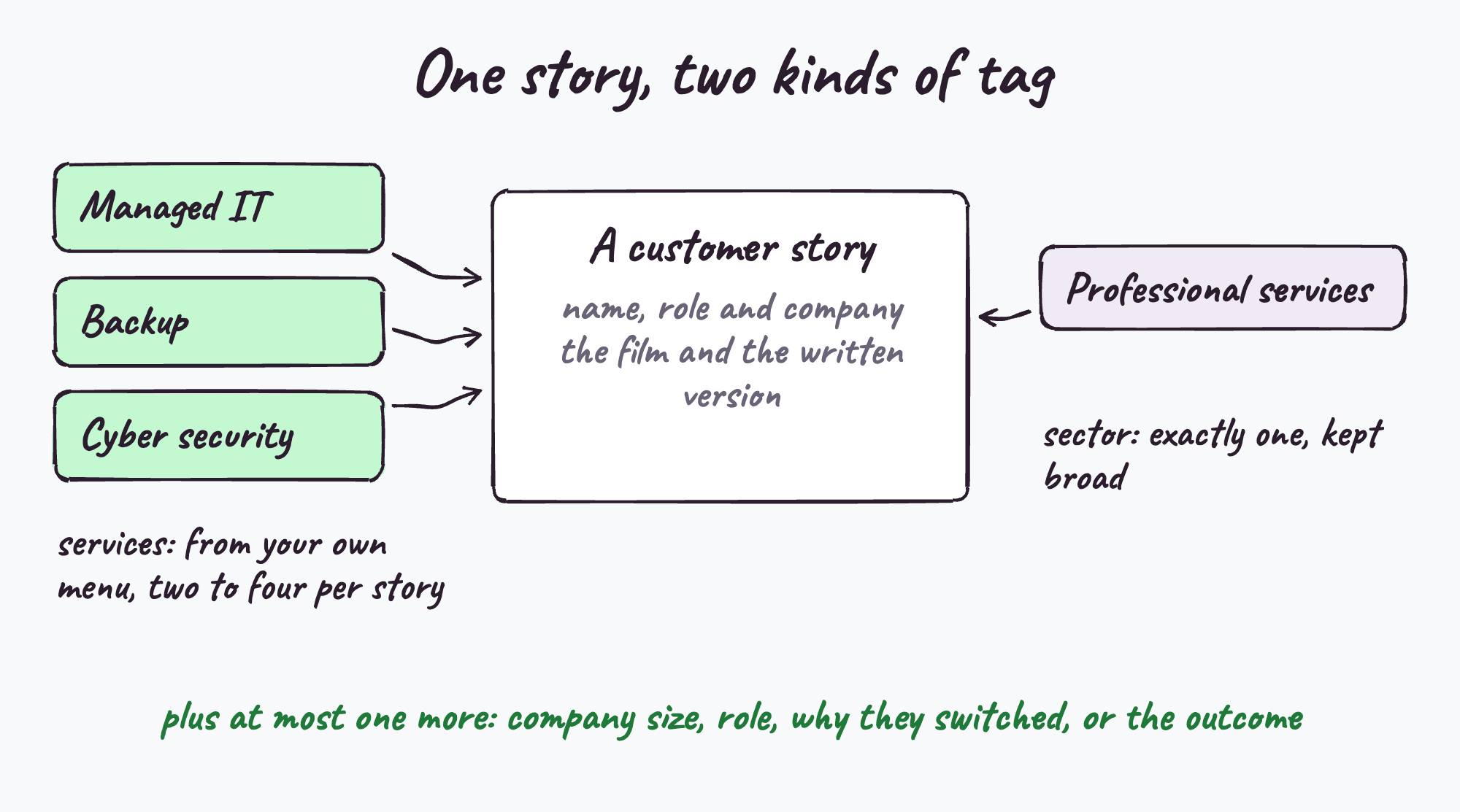
Organise website testimonials with two separate tags: the services each customer bought, using the names in your own website menu, and the one sector each customer belongs to. Add at most one extra tag your buyers care about, such as company size or why they switched. Show each story on its matching service and sector pages, link from the story back to those pages, and give the story library simple filters.
With three or four testimonials organisation hardly matters, because you put the right one on the right page and you're done. Somewhere past half a dozen it starts to matter a great deal, because a list of stories is only useful if the buyer reading it can find the one that looks like them in a few seconds.
Most MSP websites handle this with a single page of testimonials in the order they were collected. What works better is a small, boring tagging system, set up once and kept tidy. Here's the one I'd use.
Rule 1: Your menu is your list of service tags
Use the services in your website's top-level menu as your service tags, spelled exactly the way the menu spells them. If your menu says "Managed Security", the tag says "Managed Security", not "Cyber" or "Security Services".
This does two useful things. Every tag has a page to link to, and you never end up with a tag for a service nobody can find on your site. If something isn't in your menu, it doesn't get a tag.
A story usually carries two to four service tags, because customers rarely buy just one thing.
Rule 2: One sector per story, and keep sectors broad
Every story gets exactly one sector tag, and the sectors should be broad enough that several customers share each one. Something like this list works well for most MSPs:
- Construction
- Professional services
- Healthcare and care
- Manufacturing and engineering
- Finance and insurance
- Retail and hospitality
- Property and real estate
- Logistics and transport
- Education
- Non-profit
- Technology and media
The detail stays in the story itself. A commercial roofing firm is tagged Construction, and the story says commercial roofing. What you want to avoid is a tag that only ever has one customer in it, which makes a filter look empty and the library look thin.
Rule 3: Never mix services and sectors in one list
It's tempting to have one set of tags that says "Legal", "Cyber Security", "Charities" and "Microsoft 365" side by side. Keep them apart. The service tags decide where a story appears (which service pages). The sector tag decides who it convinces (which buyers see themselves in it). Mixed together, you get a tangle of tags that nobody can maintain and no buyer can filter.
Rule 4: Add one more tag, chosen for your buyers
Beyond service and sector, pick at most one extra way of sorting that reflects how your buyers think. Choose one:
- Company size, if your buyers range from 10 to 500 staff.
- The person's role, if you sell to finance directors as well as IT managers.
- Why they moved, such as switching provider, after a breach, after a merger, or for compliance.
- The outcome, such as less downtime, faster response or passing an audit.
Resist adding them all. Five services, eleven sectors and five roles is 275 combinations, and nobody with a dozen stories needs that.
Rule 5: Mark whether they bought it on day one or added it later
This one is small and surprisingly useful. For each service tag, note whether the customer bought that service when they joined or added it later. The first kind of story belongs on your service page for new prospects. The second kind is the one to send your existing clients, because it answers "are they any good at this as well?"
Rule 6: Link stories and service pages both ways
On every story page, show the services the customer bought as clickable labels, a "what they bought" row, each linking to its service page. On every service page, show the customers who bought that service, linking to their stories.
One UK MSP site I looked at does this with coloured service labels at the top of each case study, and it means a buyer reading any story is one click from the service it's about, and a buyer on any service page is one click from proof. It's the single most useful thing in this post, and it costs nothing once the tags exist.
Building the story library page
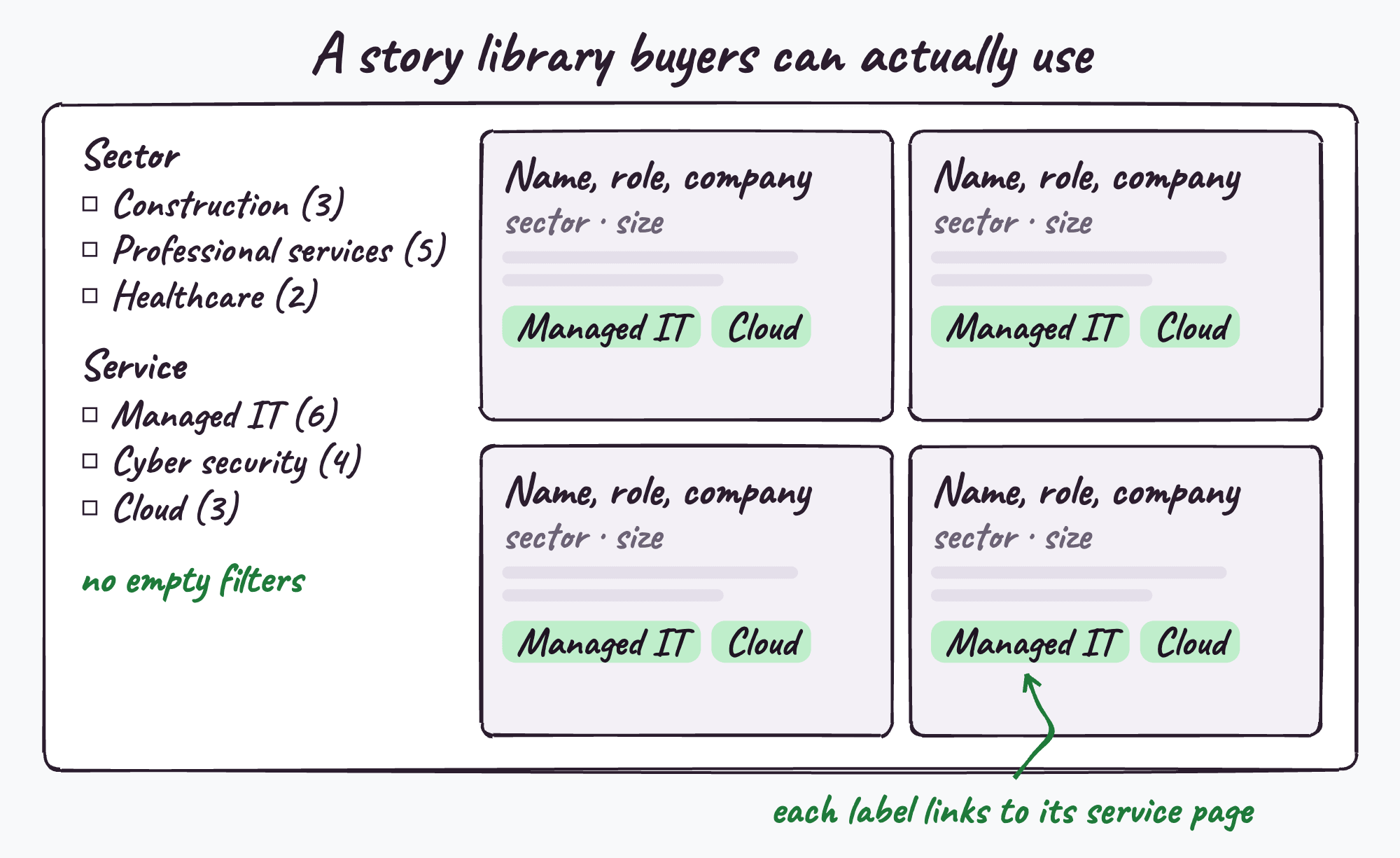
When you do have a page of stories, a few things make it work:
- Filters for sector and service, with a count next to each, so a buyer can narrow it down in two clicks.
- Never show an empty filter. "Healthcare (0)" tells a healthcare buyer you don't do healthcare.
- Each card shows the essentials: the person's name and role, the company, the sector, the size, and the service labels.
- No forms. Every story readable without handing over an email address.
- One click from the homepage, not buried three levels down.
Interview for the story, tag it afterwards
It's tempting to run a testimonial interview service by service: "tell me about our security", "now tell me about our backup". It produces a list of polite answers and no story. Ask the customer for their story, and tag the services it covers afterwards. You get the same coverage and a far better film. I've written about the questions that work in testimonial interview questions for MSPs.
Someone has to own the tags
Tags rot. Services get renamed, new ones launch, and a label that used to link to a service page quietly links to the wrong one for years. Two habits prevent it: choose tags from a fixed list rather than typing them freely, and check the list whenever your menu changes.
Questions people ask
Should testimonials be organised by industry or by service?
Both, as two separate tags. Services decide which pages a story appears on, and the industry or sector decides which buyers see themselves in it. Keep them as separate lists rather than mixing them.
How many tags should a testimonial have?
Usually two to four service tags, exactly one sector tag, and at most one extra tag such as company size or reason for switching.
Should case studies be on a separate page?
A story library page is useful as long as it isn't the only place stories live. Each story should also appear on the matching service and sector pages, where buyers are making decisions.
Does tagging testimonials help SEO?
Linking stories to the service pages they relate to, and back again, helps people and search engines see how your pages connect. Treat it as good site structure rather than a ranking trick.
Related reading
- How many testimonials does your business need?
- Where to put testimonials on your MSP website
- Six ways MSP websites hide the proof they already have
Every story we make comes with its service and sector tags worked out, and the placement decided for your own website.
See what's in the packJames interviews MSP and tech vendor customers for a living and runs MSP Testimonials, the interview-led testimonial service. If a customer of yours has a story worth telling, this is how it gets told.